Dev License: This installation of WHMCS is running under a Development License and is not authorized to be used for production use. Please report any cases of abuse to abuse@whmcs.com

How to Remove a Feature List from WHM

Follow this tutorial if you have a feature list you don't need and want it removed.


1. Log in to your WHM Account.


2. Go to Packages >> Feature Manager or type Feature Manager in the menu filter box. The option will appear. Click on it.
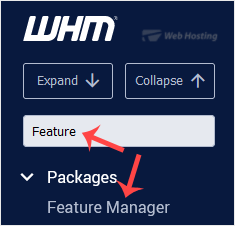
whm-reseller-feature-manager-menu.gif


3. Under Manage feature list, choose the feature list you wish to remove
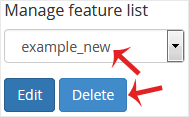
whm-reseller-featuremanager-remove-list.gif


4. Click on Delete.


Congratulations. Your selected feature list has been successfully removed.

  • 0 کاربر این را مفید یافتند
آیا این پاسخ به شما کمک کرد؟

مقالات مربوطه

How to Set Custom/Private Nameservers in WHM

You can set up custom/private nameservers from WHM. 1. Log in to WHM Account. 2. Go to Server...

How to Create/Add a Package in the WHM

You can create predefined packages in the WHM for automation or another purpose.1. Log in to your...

How to Edit a Hosting Package in WHM

You can edit the hosting package of your account. With root access, you can edit the packages of...

How to Delete a Package in WHM

You can remove the hosting package of your account, or, should you have root access, you can also...

How to Create a Feature List in WHM

You can create a feature list from your WHM Account. Feature lists allow you to provide a...

Powered by WHMCompleteSolution