Dev License: This installation of WHMCS is running under a Development License and is not authorized to be used for production use. Please report any cases of abuse to abuse@whmcs.com

How to Remove Parked Domains/Aliases in cPanel

Parked domains, also known as aliases, are additional domains that point to your main website. If you no longer need one, you can easily remove it in cPanel.

1. Log in to your cPanel account.


2. In the Domains section, click on Domains.

cp-domains-icon.gif


3.
In the List of Domains, locate the alias domain you want to remove and click Manage next to it.
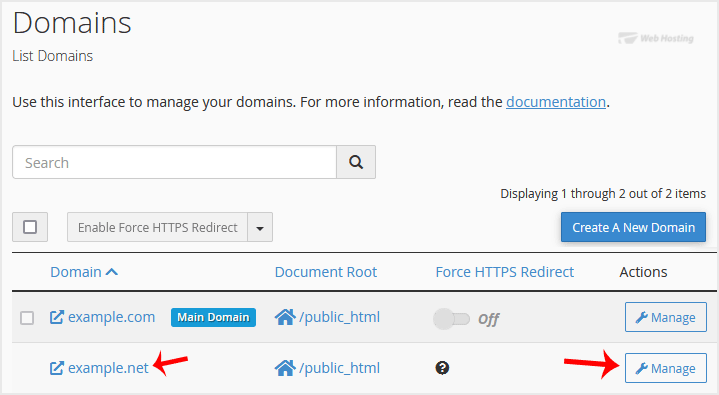

4. To remove the alias domain, click Remove Domain and confirm it.
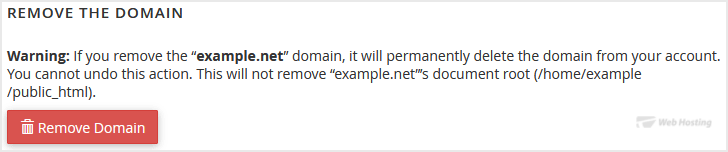


You should see a message that your parked/alias domain has been removed.

  • 0 A felhasználók hasznosnak találták ezt
Hasznosnak találta ezt a választ?

Kapcsolódó cikkek

How to Create an Alias or Park a Domain in cPanel

An Alias domain, formerly known as a parked domain, lets you create a mirror of your primary...

How to Create Addon Domains in cPanel

Before adding the addon domain, point your addon domain nameservers to your primary domain...

How to Remove an Add-on Domain in cPanel

If you no longer need an add-on domain in cPanel, you can remove it easily to free up space and...

How to Redirect an Add-on Domain in cPanel

You can redirect your add-on domain to another domain.1. Log in to your cPanel account. 2. In...

How to Create a Subdomain in cPanel

A subdomain is an additional part of your primary domain. For example, blog.example.com is a...

Powered by WHMCompleteSolution