Dev License: This installation of WHMCS is running under a Development License and is not authorized to be used for production use. Please report any cases of abuse to abuse@whmcs.com

How to Change the VNC Password in SolusVM 1

You can change the VNC password using SolusVM 1.


1. Log in to your SolusVM 1 Control Panel.

2. If you have multiple VPSs, select the appropriate one.
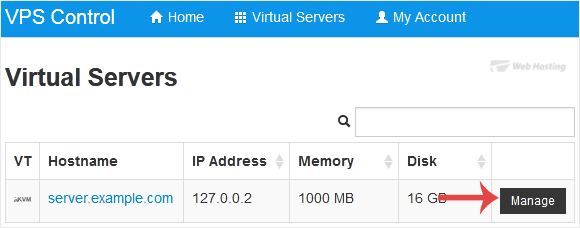
solusvm-select-vps.gif


3. Scroll down. Under the VNC Password tab, enter your new password. Then click on Change.
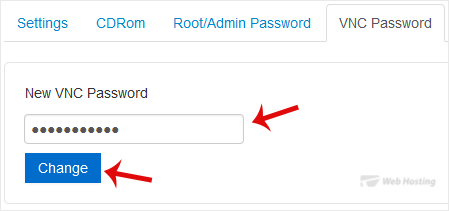
solusvm-vnc-password-change.gif


4. Click Yes to confirm and then reboot your VPS.

You have successfully changed the VNC password. Your VNC access is now protected with the new password.

  • 0 A felhasználók hasznosnak találták ezt
Hasznosnak találta ezt a választ?

Kapcsolódó cikkek

How to Reboot/Restart VPS in SolusVM 1

You can restart VPS via the command line or SolusVM 1. How to Reboot/Restart a VPS via SolusVM...

How to Forcefully or Gracefully Shut Down the VPS in SolusVM 1

You can shut down the VPS in two ways - forcefully or gracefully in SolusVM 1. How to...

How to Start/Boot Your VPS in SolusVM 1

If your VPS is down/offline, you can start it using SolusVM 1.1. Log in to your SolusVM 1 Control...

How to Access VPS via VNC in SolusVM 1

You can access your VPS via VNC in an emergency, such as when a firewall blocks your IP, the...

How to Reinstall OS Using SolusVM 1 OS-Reinstaller

You can easily Install/Reinstall the operating system using SolusVM 1. However, note that this...

Powered by WHMCompleteSolution