Dev License: This installation of WHMCS is running under a Development License and is not authorized to be used for production use. Please report any cases of abuse to abuse@whmcs.com

How to Enable or Disable the SolusVM 1 VPS Login Alert

Whenever you log in to your VPS control panel, you will receive a login email alert. You can disable this function from the SolusVM 1. However, we recommend that you enable the feature for security reasons.


1. Log in to your SolusVM 1 Control Panel.


2. From the top navigation bar, click on My Account.
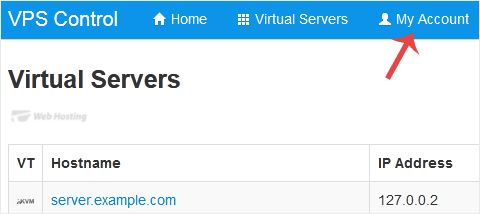
solusvm-email-address-change.gif


3. Under Account Settings, you can find a Login Alert option. If you wish to disable it, unmark the option. Alternatively, if you want to enable it, checkmark the option.
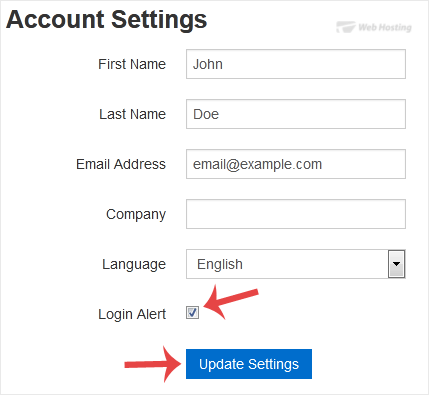
solsuvm-login-alert-enable-disable.gif

Now you know how to enable or disable the VPS login alert in SolusVM 1.

  • 0 Uživatelům pomohlo
Byla tato odpověď nápomocná?

Související články

How to Check VPS Online or Offline Status in SolusVM 1

You can check your SolusVM VPS status and determine whether the VPS is offline or online. You can...

How to Check VPS Specifications and Virtualization Info in SolusVM 1

You can check VPS specifications such as RAM, disk space, virtualization, IP Address, etc., from...

How to Change the SolusVM 1 Account Email Address

If you want to update your SolusVM 1 VPS Control panel email address, follow this instruction.1....

How to Change the SolusVM 1 Control Panel Password

If you can access your SolusVM 1 VPS control panel, you can easily change your SolusVM 1...

How to Log in to SolusVM 1 Control Panel

You can find the Control Panel URL, username and password in your VPS welcome email. SolusVM 1...

Powered by WHMCompleteSolution